
Integration Overview
Heska's cloud-based integration API is here to assist Practice Information Management Software (PIMS) providers in developing support for Heska’s analyzer data capture. Below are integration topics that provide useful information for the integration process.
Diagnostic Lab Request Process
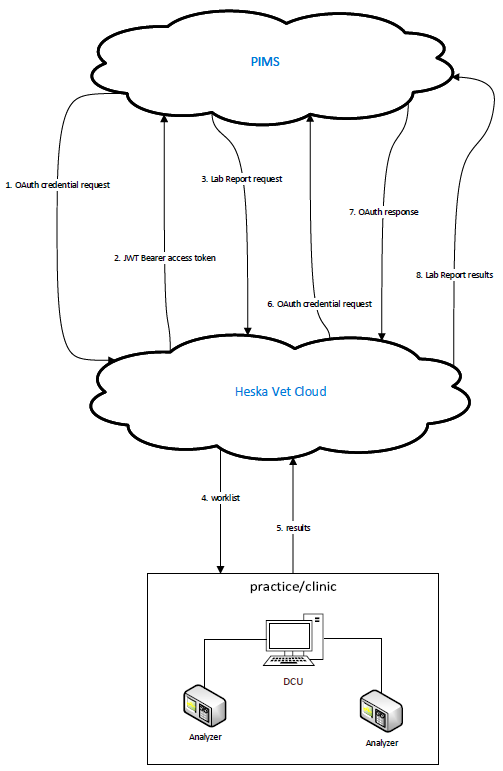
The following steps and graphic are provided to detail the communication process between PIMS and Heska Vet Cloud for requesting and receiving diagnostic lab tests and results.
1. PIMS sends OAuth Credential request to Heska API.
(API method: Get Client Credentials Access Token)
2. Heska Vet Cloud returns JWT Bearer access token to PIMS.
3. PIMS sends lab report request to Heska API.
(API method: Submit Lab Report)
4.1 Heska Vet Cloud converts the diagnostic lab into a worklist.
4.2 The worklist is sent to the DCU installation at the clinic.
5. The DCU returns results to Heska Vet Cloud.
6. Heska Vet Cloud sends OAuth credential request to PIMS.
(API method: Get Partner Client Credentials Access Token)
7. PIMS returns OAuth response to Heska Vet Cloud.
8. Heska Vet Cloud sends diagnostic lab results to PIMS.
(API method: Submit Lab Report Results)
API Calls
Subscription Key: Heska will provide each PIMS with a Subscription Key that should be placed as a value to the required "Ocp-Apim-Subscription-Key" field in the header of each API call. Each clinic within the PIMS can use the same Subscription Key for their requests.
Client Id and Secret: Heska will provide each clinic with a unique Client Id and Secret pair. The pair should be put into the body of the Get Client Credentials Token request in order to receive a JWT Bearer access token.
JWT Bearer Access Token: This is used in the Authorization field in the header for every other request.
Unmatched (Orphan) Results
Unmatched (orphan) results occur when a lab test is performed without first creating the request in the PIMS’s application. For example, an emergent patient arrives in clinic, and bloodwork is needed immediately. The technician will go straight to running tests on lab analyzers and entering patient information into PIMS will become the secondary task.
When a lab request is not created in the application, the LabResultEndPoint field in the Submit Lab Report operation is not populated. Without a value in that field, there is no way to identify which clinic to post the results back to. For test results to be returned to appropriate clinic, Heska will need the following:
PIMS URL specifically dedicated to unmatched results. Example: https://{pims}/api/unmatchedlabresults/{uniquie-clinic-id}
Unique Clinic ID to identify the clinic that originated the request.
The unique clinic ID can be a value that PIMS provides to Heska, or Heska can use the client ID that is provided to each clinic.
With the dedicated URL and clinic identifier in place, lab results that do not have a corresponding lab request can be sent back to the clinic that originated them.